Claude Code best practices focus on managing context, structuring sessions, and giving the agent clear verification criteria instead of relying on longer prompts.
- Use CLAUDE.md for concise project rules and persistent instructions.
- Use /compact when a related session becomes crowded, and /clear when moving to unrelated work.
- Delegate large investigations or independent reviews to subagents so the main Claude Code context remains focused.
- For complex tasks, use an explore, plan, implement, and verify workflow, with tests or other observable evidence defining completion.
- Match permissions, hooks, MCP integrations, and parallel sessions to the risk and complexity of the work.
Anthropic’s June 2026 research into roughly 400,000 Claude Code sessions involving about 235,000 people found that users were spending an average of 20 hours per week with the tool, while the work itself was shifting from isolated debugging toward broader activities such as operating software, analyzing data, and completing more complete workflows. [1] Those numbers help explain why Claude Code best practices now matter beyond learning a few clever prompts. Claude Code can inspect repositories, execute commands, edit files, run tests, and continue through multiple steps, which means the quality of the result depends heavily on what context the agent receives and how the session is structured. Anthropic’s own guidance now describes the context window as one of the most important resources to manage because unnecessary conversation, file contents, and command output can gradually reduce the quality of later decisions. [2] The practical lesson is simple, better results usually come from better context management, clearer verification criteria, disciplined sessions, and deliberate agentic workflows rather than increasingly elaborate instructions. This guide explains how those pieces fit together and how to use them in everyday development without turning Claude Code into an unpredictable automation layer.
Claude Code Best Practices at a Glance
Claude Code works differently from a conventional coding chatbot because it can move from understanding a request to inspecting files, taking actions, and checking the outcome. That additional autonomy is useful, but it also means that your working method becomes part of the prompt whether you intended it or not. The following summary captures the habits that have the greatest practical effect before we examine each one in detail. [2]
| Area | Better approach | Why it matters |
|---|---|---|
| Context | Give relevant files, constraints, examples, and expected behavior | Reduces guessing and unnecessary repository exploration |
| Planning | Explore first, plan complex work, then implement | Helps prevent technically valid solutions to the wrong problem |
| Sessions | Separate unrelated tasks and resume only relevant work | Keeps obsolete reasoning from influencing a new task |
| CLAUDE.md | Store concise project conventions and recurring instructions | Gives persistent project context across sessions |
| Prompts | Describe scope, symptoms, constraints, and verification | Gives Claude a measurable definition of success |
| Verification | Require tests, builds, linting, screenshots, or another observable check | Lets the agent detect and correct its own mistakes |
| Subagents | Delegate research and independent review to isolated contexts | Prevents large investigations from consuming the main context |
| Permissions | Match autonomy to the risk of the task | Keeps destructive or sensitive operations under appropriate control |
| Hooks | Use deterministic automation for rules that must always execute | Avoids relying on instructions alone for mandatory checks |
| Parallel work | Use separate sessions or worktrees for independent tasks | Prevents context and code changes from colliding |
The theme connecting all of these practices is not simply automation. It is controlled delegation. Claude Code becomes considerably more useful when you decide what information belongs in the main conversation, what can be delegated, and what must be verified before the task is considered finished.
Why Claude Code Context Has Such a Large Effect on Results
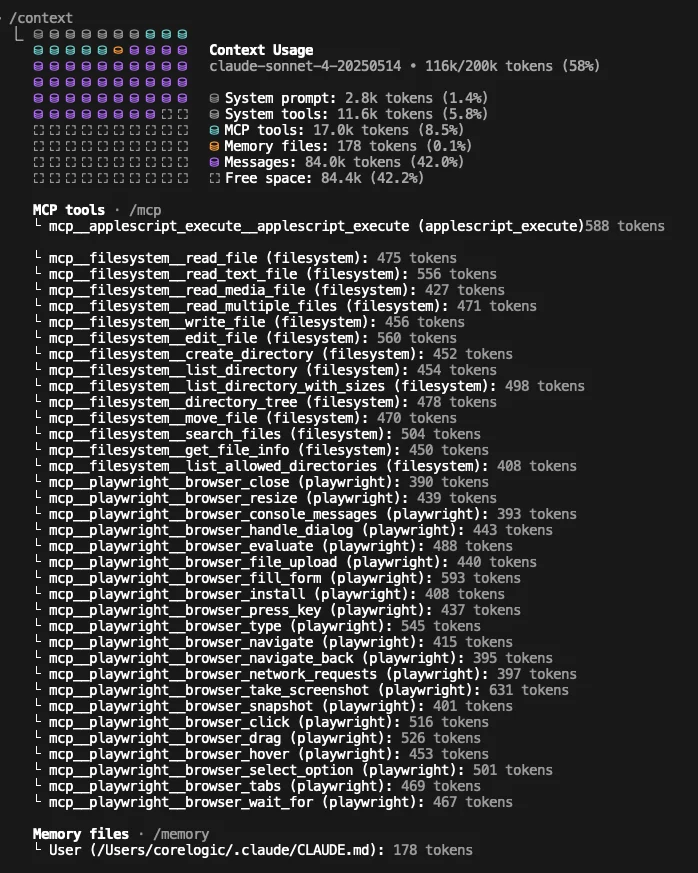
A Claude Code conversation is not an unlimited memory of your project. Its context contains the conversation, files that have been read, tool results, command output, instructions, and other information required for the current reasoning process. Anthropic warns that long debugging sessions or broad repository exploration can consume tens of thousands of tokens and that model performance can degrade as the context becomes crowded. [2]
This makes Claude Code context an engineering resource rather than merely a convenience. More context is not automatically better context. A smaller set of relevant architectural decisions, examples, errors, and constraints can be more useful than dumping an entire repository history into one conversation.
Give Claude Code the context it cannot reliably infer
Claude can inspect a repository, but it cannot automatically know which unwritten conventions are important to your team. A request such as fix the authentication bug forces the agent to discover both the symptom and your expectations at the same time. A stronger prompt names the symptom, likely location, constraints, and evidence that should prove the issue is fixed. [2]
A useful structure is:
- State the outcome you want.
- Identify the relevant part of the project.
- Explain the observable problem.
- Mention important constraints.
- Point to an existing implementation pattern when one exists.
- Define how the result should be verified.
For example:
Investigate why users are logged out after a token refresh failure. Start with the authentication code in
src/authand compare it with the existing retry logic in the API client. Do not change the database schema. Reproduce the issue with a failing test first, fix the root cause, then run the authentication tests and type checking. Report the files changed and the verification results.
That prompt does not prescribe the exact implementation. It gives Claude enough boundaries to investigate intelligently while preserving room for the agent to discover the appropriate solution.
Use CLAUDE.md for durable project context, not everything you know
Claude Code supports persistent project instructions through CLAUDE.md. Anthropic recommends using it for information that Claude should know in almost every session, including uncommon build commands, coding conventions, testing instructions, repository etiquette, architectural decisions, and environment quirks. [3]
The important detail is restraint. Anthropic explicitly advises keeping CLAUDE.md concise because excessive instructions can make the information that truly matters harder for the model to follow. [2]
A useful CLAUDE.md might contain:
# Project commands

Use pnpm for package management.

Run pnpm test auth for authentication changes.

Run pnpm typecheck before considering implementation complete.

# Architecture

API handlers live in src/api.

Business rules belong in src/domain and must not be implemented directly inside route handlers.

# Repository workflow

Do not commit generated files.

Do not modify database migrations unless the user explicitly requests a schema change.
Claude Code also supports auto memory, where Claude can preserve useful discoveries and recurring preferences between sessions. Anthropic distinguishes this from CLAUDE.md, which contains instructions written by the user or team, while auto memory stores learnings accumulated by Claude itself. [3]
That distinction is useful. Stable organizational rules belong in explicit project instructions, while discoveries such as a troublesome build command or a repository specific debugging pattern may be suitable for memory.
How to Use Claude Code with Prompts That Produce Verifiable Work
Good Claude Code prompts do not need to be long, but they should reduce uncertainty about the objective. Claude can often determine how to complete a technical task once it understands what success means. Anthropic therefore recommends giving Claude a way to verify its own work rather than relying on a final claim that something appears correct. [2]
The strongest prompts usually describe both the desired change and the evidence that should exist afterward. This turns verification into part of the agentic loop rather than something the developer remembers to perform at the end.
Replace vague actions with observable outcomes
Consider the difference between these requests.
Weak prompt:
Improve the checkout code.
Better prompt:
Review the checkout flow for duplicated validation and unnecessary API calls. Preserve current behavior and public interfaces. Refactor only where the code becomes simpler, run the checkout tests afterward, then explain which duplication was removed and show the test result.
The second version establishes scope, constraints, and evidence. Claude still has autonomy, but it has much less room to optimize for an outcome you did not actually want.
The same principle works for bug fixes:
Users receive a blank page after submitting an expired password reset token. Reproduce the failure first, identify the root cause, and add a regression test. Preserve the existing API response format. Run the relevant tests after the fix and tell me exactly what passed.
Or for unfamiliar code:
Read the payment processing flow and identify where idempotency is enforced. Do not edit anything yet. Explain the request path, the files involved, and any cases where the same payment could potentially be submitted twice.
Notice the phrase do not edit anything yet. Separating exploration from implementation can be extremely useful when you do not yet trust your own understanding of the codebase.
Ask for evidence, not confidence
Statements such as this should work are weak completion signals. Test output, exit codes, screenshots, lint results, type checks, and reproducible commands are much stronger. Anthropic’s current best practices recommend giving Claude an observable check that can close the loop on its own work. [2]
For a backend change, that may be:
Run the affected unit tests.

Run the integration test for this endpoint.

Run type checking.

Show the final git diff and summarize any remaining risk.
For a user interface change, the check might involve running the application, capturing the rendered interface, comparing it with a reference, and correcting visible differences.
This is one of the most valuable shifts in how to use Claude Code. The goal is not to persuade the model to be more careful. The goal is to construct a workflow where mistakes create evidence that the model can act on.
Claude Code Sessions, When to Continue, Compact, or Clear
Claude Code stores conversations so work can continue across multiple sittings. You can resume recent work rather than repeatedly explaining the same architecture, decisions, and progress. At the same time, preserving every previous thought is not always beneficial, so good session management means knowing when continuity is useful and when a clean context is more valuable. [4]
Claude Code provides several mechanisms for this. /context shows what is currently consuming the context window, /compact replaces conversation history with a more concise summary, and /clear begins with an empty context while leaving the earlier conversation available to resume later. [4]
Continue a session when the problem is genuinely the same
The command:
claude --continue
continues the most recent conversation associated with the current directory. You can also use:
claude --resume
to choose an earlier session, while /resume can be used inside Claude Code. [4]
Continuation is useful when a task spans several work periods and the existing discussion still contains relevant decisions. A migration, large refactor, performance investigation, or complex bug may benefit from retaining those decisions.
Naming sessions can make this easier. Anthropic recommends treating sessions somewhat like workstreams, giving them descriptive names so that a specific line of work can be resumed later. [2]
Use /compact when the work is related but the history is getting noisy
Claude Code automatically performs compaction as context limits approach, but you can trigger it manually with instructions such as:
/compact Focus on the authentication architecture, modified files, unresolved test failure, and decisions that must be preserved.
Compaction is appropriate when you still need the same project state and decisions but no longer need every exploratory command or failed hypothesis.
Anthropic documents an important detail here. Project root CLAUDE.md, unscoped rules, and auto memory are restored after compaction, while some context that was loaded only because a particular nested file or path was visited may need to be loaded again later. [5]
This means compaction should be treated as summarization, not perfect archival memory.
Use /clear when a new task has little to do with the old one
A common Claude Code mistake is keeping one conversation alive because it feels convenient. The result can be a context filled with obsolete requirements, rejected implementation ideas, unrelated file contents, and correction history.
Anthropic recommends using /clear between unrelated tasks and even suggests starting fresh when repeated corrections have cluttered a session with failed approaches. [2]
A practical rule is:
- Same objective and same architectural decisions, continue.
- Same objective but too much exploration, compact.
- Different objective, clear.
- Same codebase but independent workstream, start another session.
The goal is not to maximize session length. It is to preserve only the reasoning that remains useful.
Build a Claude Code Workflow Around Explore, Plan, Implement, and Verify
Claude Code is capable of taking action quickly, but speed is not the same as direction. Anthropic’s recommended workflow for nontrivial tasks separates exploration, planning, implementation, and verification so the agent does not start editing before it understands the problem. [2]
This workflow also gives the human natural review points without requiring constant supervision. You can inspect the proposed direction before files change, then inspect evidence after the implementation has been tested.
Phase 1, explore before changing code
Start by asking Claude to understand the relevant system.
Read the authentication flow, session management code, and existing OAuth integrations. Identify the major components and dependencies. Do not edit files yet.
For larger changes, Plan mode makes this separation explicit. Claude can examine the repository and prepare a plan without modifying source files. [6]
You can launch Plan mode with:
claude --permission-mode plan
or switch to it during an interactive session.
This stage is particularly useful when the repository is unfamiliar, the requested change affects multiple systems, or your initial understanding may be incomplete.
Phase 2, make the plan concrete enough to review
Once the relevant architecture is understood, ask for an implementation plan that names files, interfaces, testing requirements, migration concerns, and anything intentionally outside the scope.
For example:
Create an implementation plan for adding passkey authentication. Identify the affected files, changes to the current login flow, database impact, backwards compatibility concerns, test strategy, and rollback considerations. Do not implement it yet.
A good plan serves two purposes. It gives Claude a structured path to follow, and it lets you catch misunderstandings while correcting them is still cheap.
Phase 3, implement against the agreed plan
After reviewing the plan, let Claude make the change.
A useful execution prompt might be:
Implement the approved plan. Preserve the existing password login flow. Add tests for registration, successful authentication, invalid credentials, and fallback behavior. Run the affected tests and type checking before stopping.
The instruction is shorter now because the session already contains the necessary architecture and decisions.
Phase 4, verify independently
The same agent that implemented a change can run tests, but important work benefits from a second perspective. Claude Code supports subagents that work in separate contexts, making them useful for reviews that should not inherit every assumption made during implementation. [7]
For example:
Use a separate subagent to review the implementation for authorization mistakes, missing edge cases, and behavior that diverges from the plan. Do not modify the code during the review.
A fresh review does not guarantee correctness, but it reduces the risk that the same reasoning path both creates and approves the solution.
Use Claude Code Subagents, Permissions, and Hooks Without Losing Control
Agentic workflows become more powerful when tasks can be delegated, but capability should be paired with boundaries. Claude Code offers several mechanisms that solve different problems, subagents isolate work, permissions control what tools may do, and hooks enforce deterministic actions at defined points in the workflow. Treating those mechanisms as interchangeable misses much of their value. [7] [8] [9]
A good setup gives the agent freedom inside a carefully chosen operating area. It does not require approving every harmless action, but it also does not grant unrestricted access simply to avoid interruptions.
Use subagents when research would pollute the main Claude Code context
Subagents run with their own context windows and return their findings to the primary session. Anthropic specifically recommends them for repository exploration, research, specialized reviews, and other work that would otherwise fill the main conversation with large file reads or command output. [7]
Useful examples include:
Use a subagent to map the authentication architecture and return only the files, dependencies, and risks relevant to this change.
Use a subagent to search the repository for every place that assumes prices are stored in USD.
Use a separate security review subagent to inspect the final diff for injection, authorization, and secrets handling issues.
The advantage is context isolation. The main session receives the result of the investigation rather than every intermediate artifact produced while conducting it.
Match Claude Code permissions to the risk of the work
Claude Code has permission modes that control how freely the agent can edit files or execute commands. Current documentation describes modes including default, acceptEdits, plan, auto, dontAsk, and bypassPermissions, each representing a different balance between autonomy and human oversight. [6]
For sensitive repositories or unfamiliar tasks, Plan mode or the default permission behavior provides stronger review opportunities.
For routine development where file edits are expected and the developer is reviewing the diff, acceptEdits can reduce unnecessary interruptions.
bypassPermissions removes most of the permission layer and Anthropic recommends limiting it to isolated environments such as containers or virtual machines. [6]
The broader lesson matters more than the specific mode. Convenience should not determine permissions, potential impact should.
Use hooks for rules Claude must not merely remember
Instructions in CLAUDE.md guide the model, but they remain instructions. Hooks provide deterministic actions at specific lifecycle events and can therefore enforce checks that should happen regardless of whether Claude remembers to request them. [9]
Examples include:
- Running a formatter after file edits.
- Blocking access to a protected directory.
- Running a validation script before a task ends.
- Sending a notification when Claude requires user input.
- Recording selected tool activity for auditing.
A useful way to think about the difference is that CLAUDE.md says what Claude should know, while hooks define what the environment should actually do.
For safety sensitive automation, this distinction is important.
Extend the Claude Code Workflow with MCP and Parallel Sessions
Claude Code becomes more useful when the information needed for development does not have to be manually copied into the terminal. Through the Model Context Protocol, Claude Code can connect to external tools, APIs, databases, issue trackers, monitoring platforms, and other services. [10] This can turn a coding session into a broader engineering workflow where the agent can investigate the issue, inspect the repository, implement the change, run verification, and interact with supporting systems.
The same principle applies to parallel work. Instead of forcing unrelated tasks through a single conversation, separate sessions and Git worktrees can keep independent changes from sharing the same repository state or context. [11]
Connect external systems only when they improve the workflow
MCP is useful when Claude repeatedly needs information that would otherwise be copied manually from another tool. Examples include reading an issue from a tracker, querying monitoring information, looking up database metadata, or retrieving design context.
Current Claude Code documentation also uses tool search to reduce context usage from large MCP configurations by loading relevant tool definitions on demand instead of putting every available tool into the context from the beginning. [10]
That is a useful reminder that integrations also have a context cost.
Adding every possible MCP server is not automatically better. Connect the systems that materially shorten the path between the problem and the evidence needed to solve it.
Use parallel sessions for independent work, not competing edits
Claude Code supports parallel workflows through separate sessions and Git worktrees. Anthropic documents worktrees as a way to give parallel sessions separate checkouts and branches so changes do not collide. [11]
One session could investigate a production bug while another works on documentation or a separate feature. The important part is ensuring that their code changes and objectives remain independent.
For teams adopting agentic coding at scale, this is a meaningful shift. Parallelism stops being a matter of asking one large conversation to juggle many jobs and becomes an orchestration problem where each workstream has its own context and repository state.
Claude Code Best Practices for Real Development Tasks
The principles above become easier to apply when converted into repeatable patterns. Claude Code does not require one universal workflow, and Anthropic explicitly presents its recommendations as patterns that developers can adapt to their own environments. [2] The following examples cover situations where context and session management make a noticeable difference.
Debugging a difficult problem
Start with the observable failure rather than your preferred fix.
Users occasionally receive duplicate invoices after retrying a failed checkout request.

Investigate the payment and retry flow first.

Identify the code paths that can create an invoice and determine whether idempotency is guaranteed.

Do not change code until you can explain the likely failure mechanism.

Then write a regression test, implement the smallest root cause fix, run the relevant tests, and report the evidence.
This prompt encourages Claude to discover the failure before optimizing for a guessed explanation.
Working in an unfamiliar repository
Use Claude Code as a repository navigator before treating it as an implementation agent.
Explain how requests move from the public API routes to business logic and persistence.

Identify the main abstractions, where validation happens, how errors are represented, and how tests are structured.

Do not edit anything.

Return a short architecture map and recommend which files I should read first.
The resulting architecture map can become the starting context for a later implementation session.
Building a large feature
Large features benefit from separating specification from implementation. Anthropic recommends letting Claude ask clarifying questions for larger work and then starting implementation with a focused context once the specification is sufficiently concrete. [2]
A useful starting prompt is:
I want to add organization level API keys with configurable scopes.

Interview me about security requirements, data model implications, user interface behavior, backwards compatibility, auditing, rotation, revocation, and test expectations.

Do not implement anything until the specification is complete.
After the specification is written, a fresh session can implement from that document without carrying the full interview history.
Reviewing an existing implementation
Do not tell the reviewer that the implementation is probably correct. Give it an adversarial objective.
Review this change as if you were trying to reject the pull request.

Look for incorrect assumptions, missing error handling, security problems, concurrency issues, compatibility regressions, and tests that pass without proving the intended behavior.

Do not modify files.

Rank findings by severity and include file references and evidence.
A separate subagent can be particularly useful here because its isolated context reduces the chance of inheriting every assumption made by the implementation agent.
Better Claude Code Results Come from Better Workflow Design
The most durable Claude Code best practices are less about discovering a magical prompt and more about designing the environment in which the agent works. Give Claude enough context to understand the task, keep permanent instructions concise, separate unrelated sessions, use Plan mode when the solution is uncertain, delegate context heavy investigation to subagents, and require evidence before calling the work complete. Permissions and hooks can then place technical boundaries around that workflow so speed does not come at the cost of control. Anthropic’s 2026 research suggests agentic coding is already moving toward larger and more complete work rather than remaining a debugging assistant, which makes these habits increasingly important as developers delegate more of the execution process. [1] Claude Code can do a remarkable amount of work, but the developer still shapes the objective, the context, the constraints, and the definition of done. If you already use Claude Code, share your workflow in the comments, especially any context, session, prompting, or agent pattern that has consistently improved your results, and feel free to leave a question if there is a workflow you would like to explore further.
References
- Anthropic Research, Agentic Coding and Persistent Returns to Expertise
- Anthropic, Best Practices for Claude Code
- Anthropic, How Claude Remembers Your Project
- Anthropic, Manage Claude Code Sessions
- Anthropic, Explore the Claude Code Context Window
- Anthropic, Choose a Claude Code Permission Mode
- Anthropic, Create Custom Claude Code Subagents
- Anthropic, Configure Claude Code Permissions
- Anthropic, Automate Claude Code Workflows with Hooks
- Anthropic, Connect Claude Code to Tools via MCP
- Anthropic, Claude Code Common Workflows
- Anthropic, Claude Code Security
Frequently Asked Questions
Ready to apply this to your business?
Let's Talk Strategy →