Dec 2025 Update
- Models (Dec 2025): Suno runs the free v4.5-All model on Basic and the newer v5 model on paid tiers; Udio’s current engine is Allegro v1.5 with two-result generations on every prompt.
- Fast verdict: Suno still leads on speed, in-song editing (Replace/Extend/Crop), and integrated DAW-style tools; Udio is favored for cleaner lead vocals, cohesive harmonies, and ultra-transparent credit math.
- Pricing (Dec 2025): Suno Basic: 50 free credits/day (~10 songs), non-commercial; Pro: 2,500 credits/mo (≈500 songs); Premier: 10,000 credits/mo (≈2,000 songs). Udio Free: 10 daily credits + 100 monthly cap; Standard ≈ US$10 / 2,400 credits/mo; Pro ≈ US$30 / 6,000 credits/mo, with one-time 1,000 bonus credits granted to subscribers after the UMG deal.
- Editors: Suno Song Editor offers section-level Replace / Extend / Crop in one screen. Udio’s Sessions plus Remix/Extend/Inpaint favor producer-style iteration around a core idea, always yielding two versions per action.
- Stems & exports: Suno provides 12-stem extraction, WAV and download support on paid plans. Udio’s exports (WAV, stems, video) are temporarily disabled for most users during a months-long licensing transition with UMG and other labels, aside from short download windows.
- Uploads: Suno paid tiers support longer uploads (up to ~8 minutes) and deeper in-song editing; Udio uploads on paid plans are focused on guiding the model and feeding ideas into Sessions.
- Commercial use: Both platforms allow commercial use on paid tiers subject to their Terms of Service; free-tier tracks are non-commercial on Suno and require attribution on Udio. Always re-check live ToS and licensing FAQs before ads, client work, or distribution.
- Pick this if… Choose Suno for fast ideation, shorts/loops, dense section edits, and a working export pipeline. Choose Udio when vocal realism, harmony detail, and per-song credit efficiency matter most—but confirm current export status first if you need WAV or stems today.
Last checked: Dec 2025.
The Rise of AI Music Generation: Setting the Stage

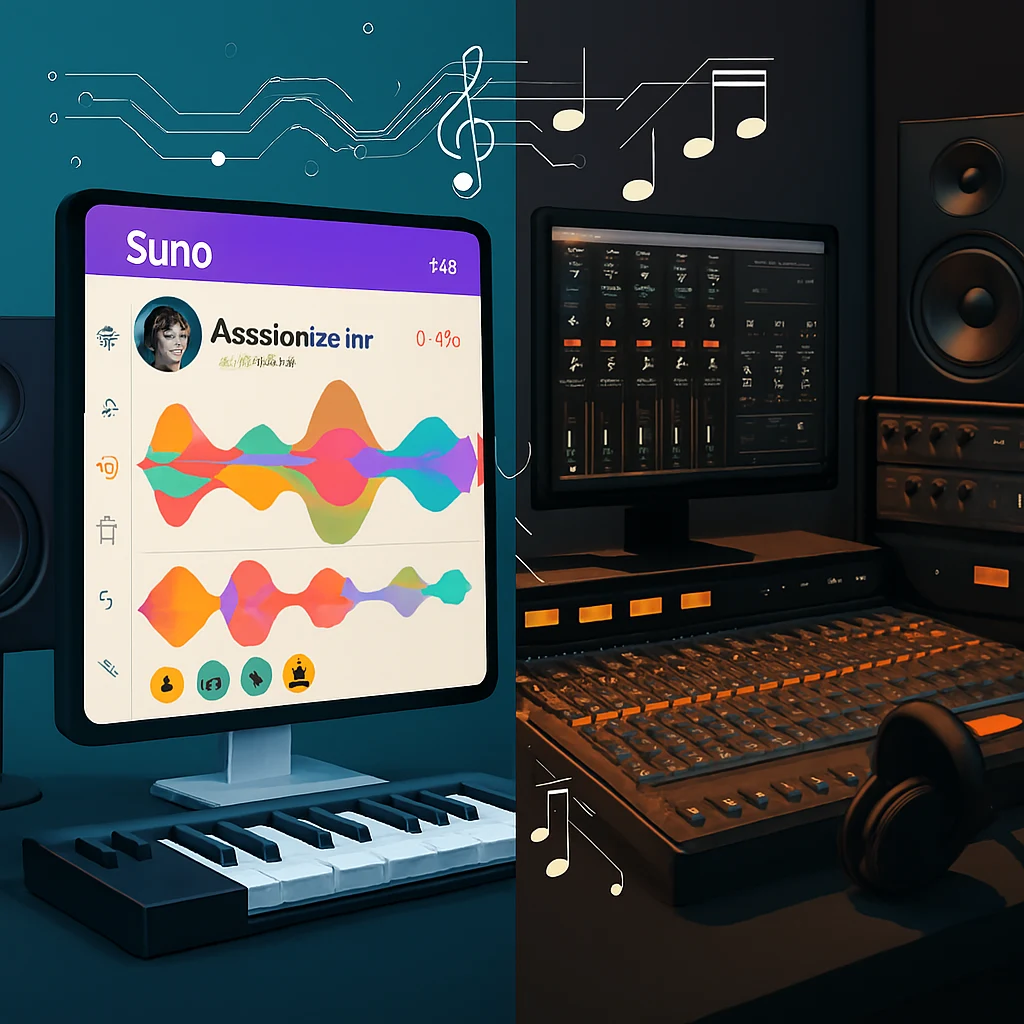
Artificial intelligence has fundamentally transformed music creation, pushing professional-sounding production into the browser for anyone with a decent connection. Both Udio and Suno emerged from serious research backgrounds: Udio is the work of former Google DeepMind and top audio-ML researchers, while Suno has grown into one of the most visible “text-to-song” platforms in the world with fast iteration and rich editing tools.
The timing couldn’t be more sensitive. Since mid-2024, the Recording Industry Association of America® (RIAA) and major labels have filed landmark copyright cases against both Suno and Udio over how their models were trained, and by late 2025 those cases sit alongside new class-action lawsuits and high-profile licensing deals. Universal Music Group has already settled with Udio and turned it toward a licensed platform, and Warner Music Group has struck a separate licensed-model deal with Suno for 2026. This legal backdrop adds a layer of risk management to every creative choice: you’re not just picking a sound, you’re picking a rights framework and a roadmap.[1][2][3]
Platform Origins and Development Philosophy
Suno: The Democratic Music Revolution
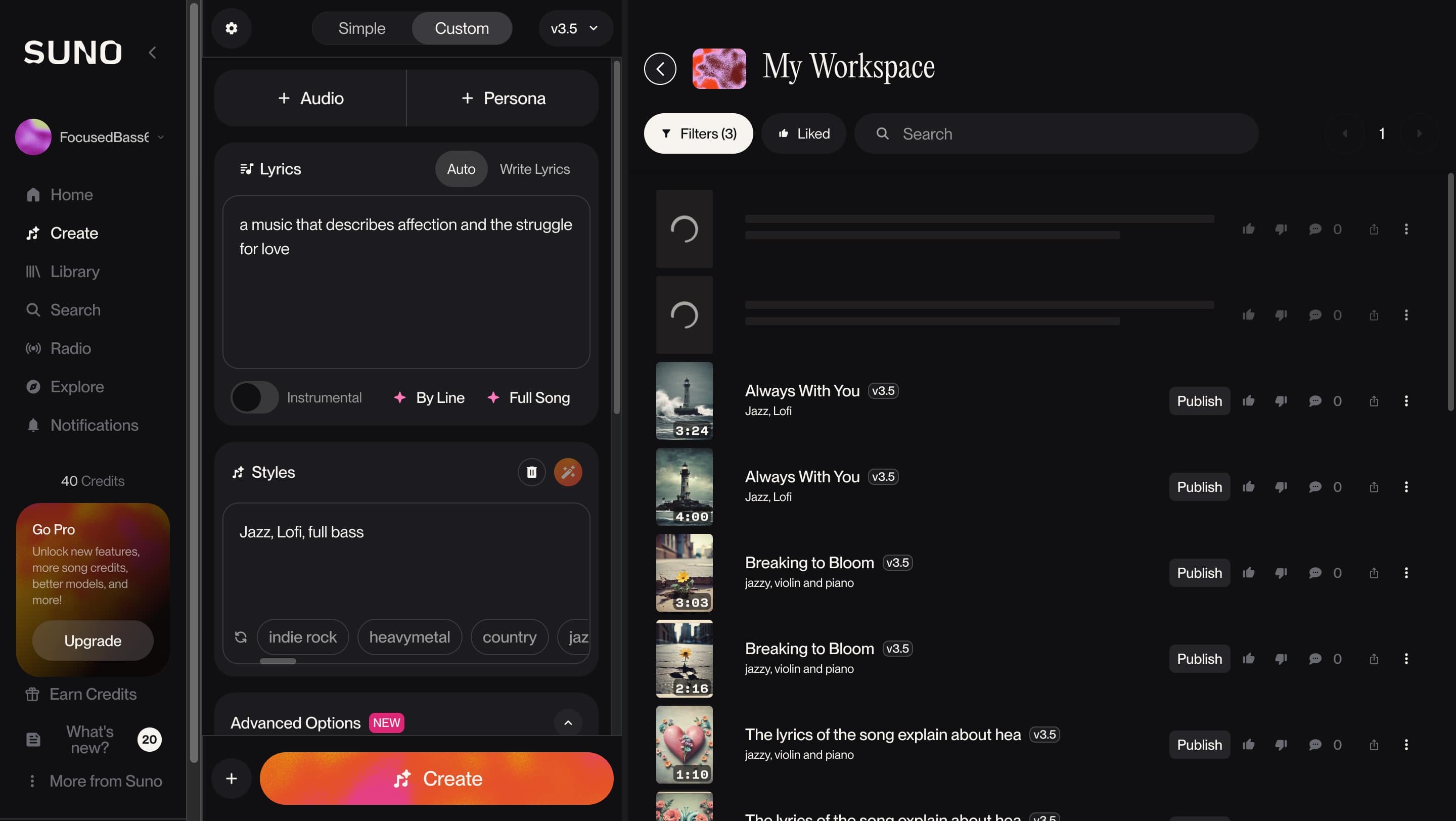
“From your mind to music.” Suno’s core idea is that anyone can make full songs without instruments or a DAW. The product leans into accessibility: a streaming-style interface, fast idea-to-demo loops, and an in-browser Song Editor that lets you replace, extend, and crop sections on a visual timeline. As of late 2025, paid tiers run v5 for the highest fidelity and feature set, while Basic/Free defaults to v4.5-All. Paid plans add twelve-stem export, uploads up to ~8 minutes, and (under new label deals) licensed models that will introduce stricter but clearer download rules and per-month export caps.[4][5]
Check out this deep-dive: Suno AI Review 2025: Features, Pricing, and How to Use It
Udio: The Professional’s Choice
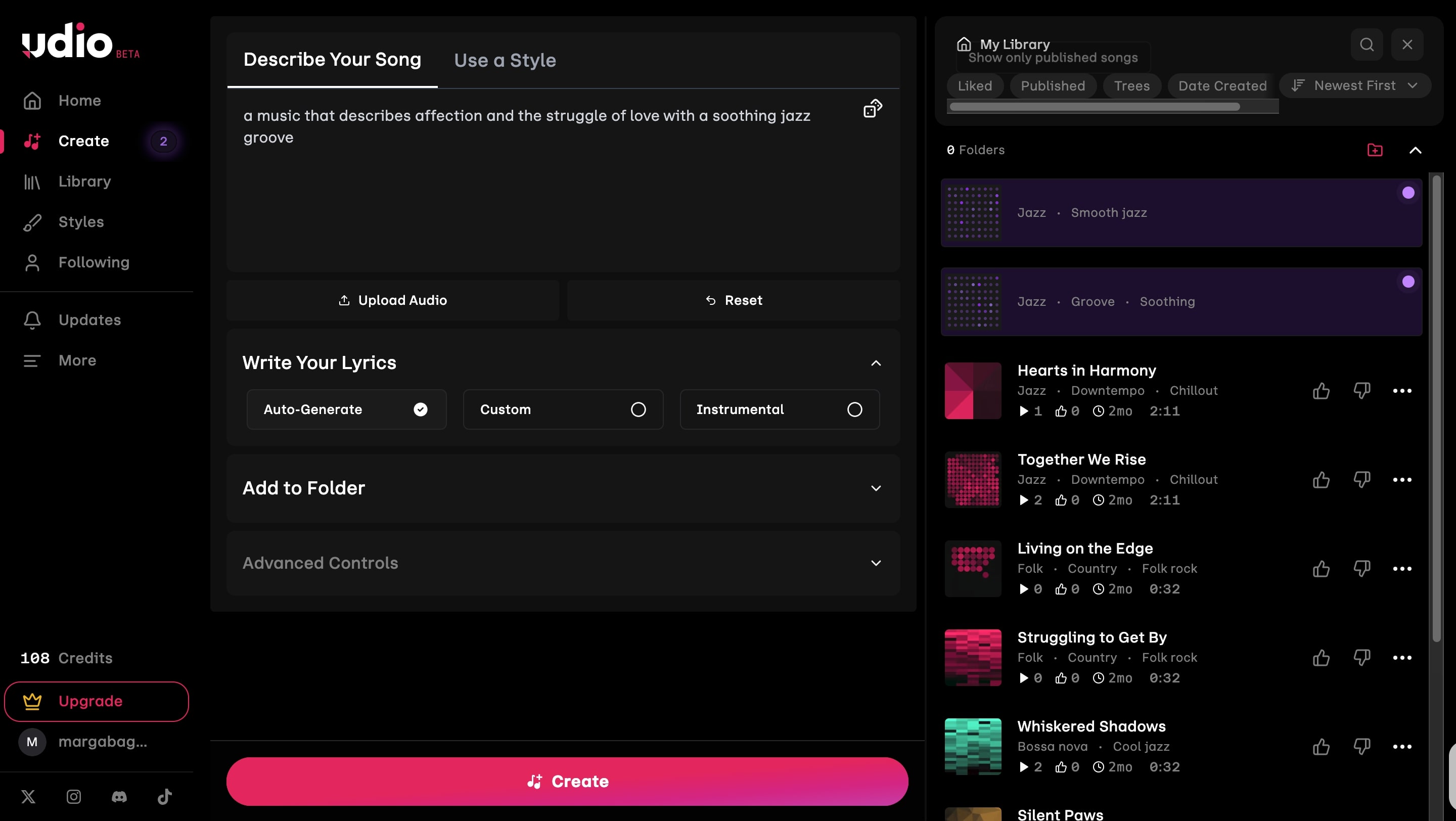
Udio prioritizes audio clarity, predictable credit math, and a producer-style flow. Sessions with Create / Extend / Remix / Inpaint / Edit return two results per action for fast A/B picks, and credit use is completely transparent: 32-second pairs cost 2 credits, while ~130-second “u-130” pairs cost 4 credits. The 2025 Allegro v1.5 update made generation noticeably faster without sacrificing quality, which is why many producers treat Udio as their “idea engine” when testing melodies and hooks. Current note: after Udio’s licensing agreement with UMG and other labels, audio/video/stem downloads are temporarily disabled across plans, with only short download windows reported; if you need files today, you must confirm export status in-app before committing a project.[6][7]
What’s new in late 2025
- Suno (v4.5-All free; v5 paid): section-level Song Editor, 12-stem export, uploads up to ~8 minutes on paid tiers, and a roadmap toward fully licensed models after a 2025 settlement with Warner Music Group. Free gives 50 credits/day for personal/non-commercial use; paid tiers include commercial terms and will move to licensed-model downloads with monthly caps—check the live ToS and licensing pages for the latest details.[4][5][8]
- Udio: monthly credit limits increased to 2,400 (Standard) and 6,000 (Pro) with pricing roughly unchanged (~$10 / ~$30). A one-time 1,000-credit bonus was granted to existing subscribers, and Pro can now run more concurrent song sets. Two-result generations keep effective cost per ~130-second song in the ≈$0.008–$0.010 range with disciplined retries. Exports remain temporarily paused as part of the UMG licensing transition—status can change, so always verify in-app if delivery files are mission-critical.[6][7][9]
Narrative TL;DR (read this if you’re choosing today)
- Pick Suno when velocity matters: you want a brief → draft → surgical fixes in the Song Editor → 12 stems → deliver workflow, with working exports and a clear path toward licensed models in 2026. For many content teams and agencies, that speed plus stems outweighs a slightly higher cost per track.
- Pick Udio when the vocal carries the story: you might take a couple of extra passes, but you often get tighter phrasing and cohesive harmonies with very low per-song credit costs. In December 2025, treat Udio as a powerful idea and catalog machine first, and double-check export status if you need WAV, stems, or video files for client delivery today.
Last checked: Dec 2025.
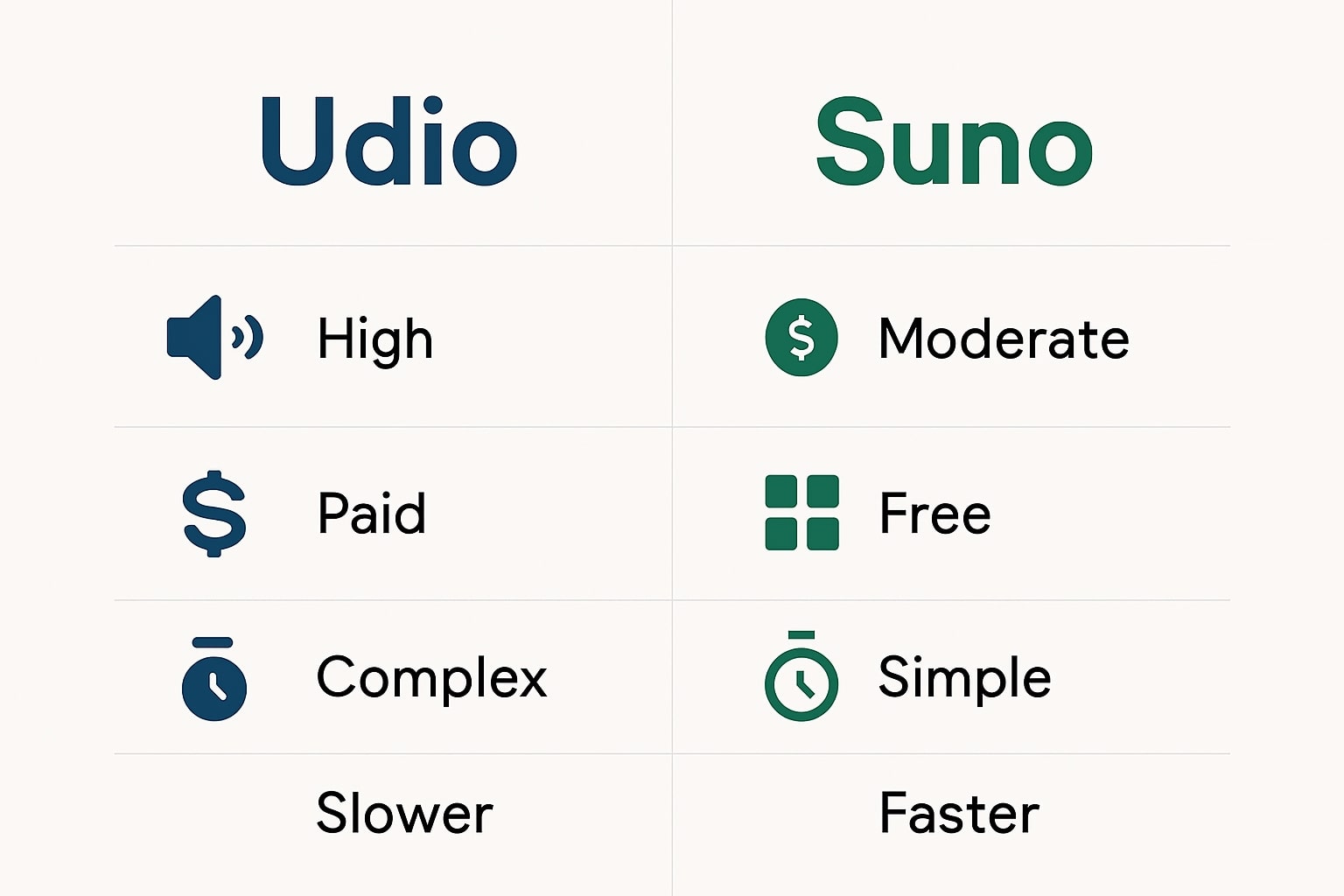
Feature Comparison: Where Each Platform Excels
Audio quality and fidelity
Both tools can reach “release-ready” for many use cases, but they have different sonic signatures and trade-offs.
Suno (v5 on paid; v4.5-All on free): the current paid model (v5) delivers polished, streaming-ready audio with solid vocal realism, stable structures, and consistent mixes across genres. Paid plans also unlock up to 12 time-aligned stems from each track for DAW work, so you can rebalance drums, bass, instruments, and vocals in detail.[4][15] Free users run v4.5-All, which still offers decent long-form coherence but without the full fidelity and feature set of v5.[4][16]
Udio (Allegro v1.5): emphasizes vocal clarity, cohesive harmonies, and smooth mixes. Sessions return two results per action, so phrasing and blend can be A/B-picked quickly. The Allegro v1.5 update focuses on substantially faster generations with similar quality to v1.5, which makes it easier to audition many toplines or hooks in a short time.[6][17] In practice, Udio’s output often feels a bit more “sung” and genre-accurate when the vocal leads the arrangement.
Note: After Udio’s 2025 licensing deal with Universal Music Group, downloads/exports (WAV, stems, video) from the current platform are disabled, with only a brief 48-hour grace window offered in early November. The new, licensed service is expected to run as a more closed streaming/remix environment, so treat exports from Udio’s present platform as unavailable for now.[6][18][40][41]
User interface and accessibility
Suno: prioritizes accessibility and speed. The interface feels like a familiar media app, and the in-browser Song Editor lets you Replace, Extend, and Crop sections on a timeline without leaving the browser.[15] Community discovery (trending songs, shared prompts, Discord) helps new users learn quickly and recycle structures that already work.
Udio: is more utilitarian, tuned for producers who want granular control rather than a social feed. The workflow centers on Create / Extend / Remix / Inpaint / Edit actions with clear credit costs and two results per step for quick A/Bs, which rewards specific prompts and structured iteration once you understand the knobs.[21]
Generation speed and workflow
Suno: excels at time-to-demo. Paid tiers benefit from priority queues, and the Song Editor minimizes context switching—brief → draft → surgical fixes → stems → export—inside one screen.[15][23] For agencies and content teams working on social deadlines, that integrated flow often feels faster end-to-end, even if Suno’s per-song cost isn’t the absolute lowest.
Udio: can feel slightly slower per individual generation, but Allegro v1.5 has cut wait times significantly versus earlier builds.[17] Because each action returns two candidates, you get built-in A/B selection without reprompting, which is powerful when shaping leads and harmonies. With the new 2,400 / 6,000 credit caps, high-volume experimentation is still cheap—your main bottleneck today is the inability to export WAV/stems rather than credits.
Bottom line: choose Suno when velocity, section-level edits, and a working export/stem pipeline matter most. Choose Udio when the vocal carries the story and you want predictable per-song costs with A/B takes—while accepting that, in late 2025, you may need another tool for final exports and mastering.
At-a-Glance Table
| Category | Suno (2025) | Udio (2025) |
|---|---|---|
| Latest model | v5 on paid; v4.5-All on free | Allegro v1.5 as default v1.5 variant |
| Core idea | Finish fast with in-browser control and stems | Chase vocal realism and harmonic polish with cheap A/B takes |
| Editing | Song Editor (Replace / Extend / Crop) on a timeline | Sessions + Create/Extend/Remix/Inpaint/Edit — producer-style iteration |
| Stems | Up to 12 stems on paid tiers, DAW-ready exports | WAV + stems historically available on paid tiers — downloads currently disabled after UMG deal |
| Uploads | Free ≈ up to 60s; paid up to ~8 minutes per project[11][12] | Uploads available on paid tiers; durations and options vary by release and may change as the new licensed platform rolls out |
| Typical sound | Consistent structure across genres; strong for ads, shorts, and cues | Smoother lead vocals and cohesive harmonies; strong for vocal-led tracks |
| Learning curve | Lowest barrier; feels like a familiar streaming app | Higher; rewards detailed prompts and iterative Sessions |
| Best for | Agencies, content teams, and creators on tight deadlines needing stems and exports now | Artists/producers who prioritize vocal feel and cost efficiency, and can live with a “walled-garden” export situation for the moment |
Last checked: Dec 2025.
Pricing Analysis: Value for Different User Types
Plans, Credits & Value in 2025
| Feature | Suno | Udio |
|---|---|---|
| Latest version | v5 (paid tiers); Free runs v4.5-All | Allegro v1.5 (current default model) |
| Best for | Speed, in-song iteration, content/shorts | Vocal clarity, cohesive harmonies, polished mixes |
| Vocal quality | Lifelike, expressive, strong across many genres | Crisp, present, often more “sung” and genre-accurate |
| Instrumentation | Good, genre-blending and consistent structures | Strong, especially rock/metal and melody-led styles |
| Stem export | 12-stem extraction (paid tiers, DAW-ready) | WAV + stems historically on paid tiers — downloads/exports currently disabled (Dec 2025) |
| In-song editing | Song Editor: Replace · Extend · Crop on a timeline | Sessions + Remix/Extend/Inpaint/Edit — producer-style iteration with two-result generations |
| Uploads | Longer uploads on paid tiers (up to ~8 min) | Uploads on paid tiers mainly for guiding ideas; details can change with licensed platform rollout |
| DAW integration | No native plugin; export WAV/stems to any DAW | No native plugin; WAV/stem exports to DAWs are temporarily unavailable during the licensing transition |
| Voice reference | Limited / evolving; check in-app tools and Studio roadmap | Style/voice conditioning and reference options available; verify current controls in-app |
| Lyric refinement | In-app lyric tools vary by release; verify in-app | In-app lyric handling and edits vary by release; verify in-app |
| Generation speed | Varies by load; typically fast with priority on paid tiers | Varies by load; faster since Allegro v1.5, plus two-result generations per action |
| Pricing (Monthly) | Pro: US$10/mo (or US$96/yr ≈ US$8/mo); Premier: US$30/mo (or US$288/yr ≈ US$24/mo) | Standard: ≈ US$10 (2,400 credits/mo) · Pro: ≈ US$30 (6,000 credits/mo) |
| Free tier | 50 credits/day (~10 songs), non-commercial | 10/day + 100/mo backup credits; cap ~3 u-130 songs/day on free & trials; attribution required when publishing |
| Commercial license | Available on paid tiers (check ToS and consent policies) | Available on paid tiers (check ToS, licensing, and export limitations) |
| Legal/Policy note | Active lawsuits and new label deals (e.g., Warner) mean model and download rules will keep evolving — always verify current ToS. | Post-UMG settlement: downloads disabled and a new licensed platform is coming — rights, exports, and usage rules are in flux; always check the latest docs. |
Budget tip: track credits per finished asset for a week in each tool. Choose a tier that comfortably covers your peak week, not just your average, and remember that unused subscription credits on both platforms do not roll over. Last checked: Dec 2025.
Suno pricing structure
Suno uses a simple, tiered credit system. The Basic (Free) plan grants 50 credits/day (about ten songs) for non-commercial use, while paid tiers expand monthly credit pools and include commercial terms. If you exhaust monthly credits on a paid plan, Suno falls back to the same 50/day pattern until your next refresh.[4][10][11]
Current Suno pricing (Dec 2025)
- Basic (Free): 50 credits/day (~10 songs), non-commercial; access to the v4.5-All model on the free tier.
- Pro: US$10/mo or US$96/yr (~US$8/mo), with 2,500 credits/month, commercial use, and optional paid top-ups.
- Premier: US$30/mo or US$288/yr (~US$24/mo), with 10,000 credits/month, commercial use, and higher headroom for heavy catalogs.
Notes: Included subscription credits do not roll over; purchased top-ups do not expire but require an active subscription to use. When monthly credits are used up on Pro/Premier, accounts still receive 50 free credits/day until the billing cycle resets.[4][10]
Last checked: Dec 2025.
Udio pricing model
Udio maps credits to pairs of generations: a 32-second pair costs 2 credits (one per song) and a ~130-second “u-130” pair costs 4 credits (two per song). Because every Create / Extend / Remix / Inpaint / Edit action always returns two outputs, it’s easy to predict how many usable songs you can get from a monthly pool.
Udio plans (Dec 2025)
- Free: $0, with 10 daily credits + 100 monthly credits as hard limits. Credits don’t roll over, free & trials are capped at roughly 3 × u-130 (~2-minute) songs/day, and public releases from a free account must include attribution such as “Created with Udio”.
- Standard: ≈ $10/month for 2,400 credits/month, no daily cap. Credits reset each month and don’t roll over; a-la-carte top-ups can be purchased and never expire.
- Pro: ≈ $30/month for 6,000 credits/month, no daily cap. Designed for heavy users and small teams, with the same non-rollover rules and non-expiring top-ups for peak periods.
Important: Following Udio’s 2025 licensing deal with major labels, downloads/exports (WAV, stems, video) are currently disabled across plans during a transition period. The Help Center confirms the new 2,400 / 6,000 monthly limits and the export pause; always check in-app or in the latest docs if you must deliver downloadable files today.
Last checked: Dec 2025.
More on AI Music Pricing & Rights (Nov 2025)
Genre Specialization and Creative Capabilities
Suno’s Versatility Advantage
Key features on Suno’s latest stack include support for 1,200+ musical genres and mashups, improved vocal expressiveness with natural phrasing and vibrato, plus longer track generation of up to ~8 minutes per song on paid tiers.[12] This breadth makes Suno extremely versatile for creators who jump between niches—TikTok edits, podcast beds, trailers, or artist mockups.
In practice, Suno shines in pop, EDM/electronic, hip-hop, cinematic, and other mainstream genres. If you want to experiment in styles you don’t deeply know—EDM, orchestral, K-pop, or hybrid crossovers—Suno’s genre palette and stable structures give you usable songs quickly without needing conservatory-level theory.
Udio’s Professional Focus
Udio covers a smaller but still broad range of genres, and tends to win in specific “band-driven” categories. Rock and metal are frequent highlights: guitars, drums, and dynamic shifts often feel closer to human studio output, especially when you lean on Udio’s A/B generations per action to dial in groove and phrasing.[13]
Where Udio really stands out is in vocal-led, harmony-rich tracks. Allegro v1.5 emphasizes clarity, blend, and stability; hooks and harmonies usually land with fewer artifacts, which suits complex arrangements, emotional ballads, or alt-rock that needs clean top lines. Genre coverage may be narrower than Suno’s 1,200+ label map, but within its sweet spots, Udio’s composition and vocal feel can be more convincing for careful listeners.
Here the music “composition feel” from Udio often better matches traditional genre expectations—especially in rock/metal and vocal-centric styles—while Suno still leads in breadth, casual experimentation, and multi-genre mashups.
Legal Considerations and Copyright (Dec 2025)

The legal environment around AI music tightened significantly in 2024–2025. This section gives a factual snapshot so you can plan releases with your team while staying aware of the risk landscape.
Key litigation you should know
- US lawsuits (June 2024): On behalf of major labels, the RIAA filed landmark copyright suits against Suno (Massachusetts) and Udio (New York), alleging mass infringement from using copyrighted sound recordings in model training without permission.[14]
- Amended complaints & stream-ripping (2025): Later filings expanded allegations to include DMCA 1201 “stream-ripping” claims, arguing that both platforms circumvented YouTube’s technical protections to scrape audio for training.[15]
- European actions (2025): German CMO GEMA sued Suno in early 2025 over unlicensed use of members’ works, and Danish CMO Koda followed with a separate lawsuit in November 2025, calling alleged AI training on its catalog “the biggest theft in music history.”[16]
- Udio × UMG (Oct 2025): Udio reached a strategic, licensed-platform deal with Universal Music Group. As part of the transition, Udio increased subscription credit limits (Standard ~2,400, Pro ~6,000 per month), granted a one-time 1,000-credit bonus, and disabled downloads/exports (WAV, stems, video) on the current platform while a new licensed experience is built.[17]
- Warner × Suno (Nov 2025): Warner Music Group settled its own case with Suno and announced a licensing partnership. This paves the way for licensed AI models in 2026 and introduces new download restrictions: free-tier users will be limited to streaming/sharing, while paid users get monthly download quotas plus paid add-ons.[18]
Platform licensing snapshot (verify in-app)
- Suno. Suno’s docs and community guidelines still draw a sharp line:
- Basic (Free): songs are for personal, non-commercial use only; Suno retains ownership of free-tier output, and you must follow ToS and community rules.[19]
- Pro / Premier: songs created while subscribed include commercial use rights (e.g., streaming distribution, monetized YouTube, direct sales, client work) and you remain the owner of those songs even after canceling.[20]
- No retroactive rights: upgrading later does not automatically convert older free-tier songs into commercially usable tracks; Suno may grant exceptions case-by-case but it’s not guaranteed.[21]
- Udio. Udio’s Help Center states that you own the outputs you generate and can generally use them for personal and commercial purposes, provided you don’t inject third-party copyrighted material (lyrics, samples, or stems you don’t control).[22] Historically, free accounts were required to include attribution such as “Created with Udio,” while paid subscribers did not need attribution; community and blog summaries still echo this guidance.[23] Policies may evolve alongside label deals, so treat the latest ToS and Help Center entries as your source of truth.
Practical policy hygiene (team checklist)
- Maintain a provenance log for each track: prompts, lyrics, plan tier (free/paid), model/version, render dates, revision notes, and who signed off.
- Avoid sound-alike prompts and don’t paste lyrics, stems, or samples you don’t have rights to; keep references descriptive (“’90s alt-rock with jangly guitars”) instead of imitative (“make it sound like [artist]’s hit”).
- Before delivery, save PDFs or screenshots of current ToS/licensing pages and your subscription status; archive these with stems/masters.
- For ads, libraries, or sync, include a short “AI-generated asset memo” in the delivery: tool, version, license type (free vs paid tier), attribution status, and any platform-specific limitations (e.g., export caps, streaming-only models).
Professional use cases and industry applications
Content creation & marketing
Both tools comfortably cover day-to-day content needs; the difference is how they fit your deadlines and sound priorities.
- Social & ads: For tight timelines and frequent revisions, Suno is often more time-efficient: brief → draft → section-level edits → stems → delivery, all inside one Song Editor.
- Podcast beds & bumpers: Suno’s consistent structures make it easy to build repeatable loop beds and stings; Udio is great when the voice or lead line needs to feel more natural and emotive.
- Product promos & explainers: Choose Suno when you need fast alt cuts (shorter, longer, different energy) from the same core idea; choose Udio when you want cleaner phrasing, harmonies, and a vocal that sits nicely under voice-over.
- Game loops & trailers: Udio’s two-result generations per action help you audition motifs quickly; Suno’s 12-stem exports make it straightforward to rebalance intensity and FX in a DAW.
Music industry adoption
Musicians and producers increasingly use AI tools for ideation, demoing, and arrangement exploration, not as full replacements for human performance. Common studio uses include:
- Generating alternate choruses or bridges to test topline directions before committing to live tracking.
- Sketching genre references for briefs, then re-recording with human vocalists and players.
- Producing background cues and temp tracks for edits, client reviews, or mood boards before the “real” session.
Policy hygiene remains essential: avoid obvious sound-alike references, keep clear provenance logs, and re-check live licensing and consent rules before distributing anything at scale.
Collaborative features & workflow integration
Suno’s community-centric approach
- In-song editor dramatically reduces round-trips: you can Replace, Extend, or Crop sections on a timeline instead of regenerating entire songs.
- Discovery & sharing via trending feeds and community spaces (including Discord) help teams agree on references, prompts, and structures in minutes.
- Delivery: up to twelve time-aligned stems on paid tiers slot directly into DAWs, making versioning, language swaps, or alt-mixes (no drums, instrumental, TV mix) straightforward.
Udio’s producer-style flow
- Sessions with two-result generations give you instant A/B choices for phrasing, harmonies, and rhythmic feel—useful when you’re hunting for a specific hook.
- Transparent credit math (32-second pair = 2 credits; ~130-second “u-130” pair = 4 credits) makes budgeting across a campaign or client roster much easier.
- Export caveat: downloads/exports (WAV, stems, video) are currently disabled as part of the UMG-backed licensing transition, so treat Udio as a sketch and streaming environment unless in-app docs clearly state that exports are back.
Suggested team pipeline (works for both tools)
- Brief — define mood, BPM/tempo range, key (if known), structure (intro/verse/chorus/bridge), and 2–3 reference tracks.
- Prototype — generate 3–5 options; log prompts, model/version, tier (free vs paid), and credits spent.
- Select & refine — use A/B Sessions (Udio) or in-song edits (Suno) to lock structure, dynamics, and key motifs.
- Export to DAW — when available, move stems/WAV into your DAW for arrangement tweaks, loudness, and deliverable formats per platform.
- QC & rights — confirm which tier generated the final assets, whether attribution is required, and capture a quick “rights snapshot” (ToS date + subscription screenshot).
- Publish & archive — store prompts, stems, mix notes, rights docs, and final links where your team can reuse or adapt them for future campaigns.
Last checked: Dec 2025.
Practical Usage Guide: Prompt Examples and Best Practices
Understanding how to effectively use each platform requires examining their prompt systems and generation approaches. Both platforms use text-to-music generation, but their prompt handling and output styles differ significantly.
Suno Prompt Examples and Workflow
Suno excels with straightforward, descriptive prompts that anyone can master quickly. The platform offers both Simple Mode for beginners and Custom Mode for advanced users.
Basic Prompt Structure:
"Upbeat electronic dance music with heavy bass and energetic vocals about summer nights"
Advanced Custom Mode Example:
Genre: "Future Bass, Electronic, Energetic"
Lyrics: [Custom lyrics or auto-generate]
Mood: "Uplifting, Party, High-energy"
Instruments: "Synthesizers, Heavy Bass, Electronic Drums"
Content Creator Example:
"Calm acoustic guitar background music for YouTube videos, instrumental only, 3 minutes, no vocals, gentle and warm"
Professional Marketing Example:
"Corporate motivational background track, piano and strings, inspiring and uplifting, suitable for business presentations"
Pop ballad vocal
intimate female vocal, modern pop ballad, 90–120 seconds, soft piano + warm pads, subtle live drums, rich chorus harmonies, clear diction, radio‑friendly, cinematic lift in last chorus, clean mix, gentle plate Corporate instrumental
uplifting corporate underscore, 90 seconds, electric piano + palm‑mute guitar + light percussion, bright and optimistic, edit points every 8 bars, sting ending at 0:28 and 0:58Suno's strength lies in understanding natural language descriptions and quickly generating usable results. The platform automatically suggests genre tags and styles, making it accessible for users without deep musical knowledge.Udio Prompt Examples and Advanced Techniques
Udio requires more sophisticated prompting but rewards users with higher-quality, more nuanced output. The platform excels when users provide detailed musical context and specific stylistic guidance.
Professional Rock Example:
"Hard rock song with powerful drums, bluesy guitar riffs, raw male vocals, lyrics about overcoming challenges, Led Zeppelin influenced, dynamic tempo changes"
Classical Composition Example:
"Orchestral piece in D minor, dramatic strings section, French horn melody, cinematic and emotional, suitable for film score, 4/4 time signature"
Electronic Producer Example:
"Deep house track, 128 BPM, analog synthesizer leads, filtered bass line, minimal vocals, underground club atmosphere, progressive structure"
Jazz Fusion Example:
"Jazz fusion instrumental, complex chord progressions, saxophone lead, electric guitar comping, syncopated rhythm section, modal harmony"
Udio – Indie folk vocal
indie folk, intimate lead vocal, fingerpicked acoustic + cello swells, 80–95 BPM, verse–chorus form, airy backing harmonies in chorus, natural room reverb, warm tape feelUdio – Cinematic build
inematic underscore, evolving texture, low strings ostinato, felt piano, subtle synth pulses, crescendos every 16 bars, ends with soft resolution, no vocalsTip: reference eras/production traits instead of specific copyrighted songs; describe timbre, space, and arrangement.
Below the prompt box, Udio will often suggest tags as starting points to click and refine the style and direction of your song. This collaborative approach between user input and AI suggestions often produces more sophisticated results.
Platform-specific optimization tips
For Suno success
- Use clear, simple language that nails mood and energy (e.g., “uplifting, mid-tempo, warm pads, clean lead vocal”).
- State the intended use (ad cut, social loop, podcast bed, trailer cue) to guide structure, dynamics, and section density.
- Leverage genre suggestions and trending styles; combine descriptive genre labels and moods rather than stacking artist names.
- Explore broad genre combinations first, then refine with section-level edits in the Song Editor (Replace / Extend / Crop and related tools).
- Use Extend for longer cues, then export up to 12 stems on paid tiers for detailed polish in your DAW—especially useful before upcoming download caps roll in under the Warner partnership.[25][26]
For Udio excellence
- Include musical terminology: BPM/tempo range, key, groove (e.g., “swung 8ths,” “four-on-the-floor”), arrangement notes (intro/verse/chorus/bridge).
- Reference styles/eras (“’90s alt-rock with crunchy guitars”) rather than sound-alike prompts or direct lyric/melody quoting.
- Specify instrumentation and mix priorities (e.g., “dry vocal up-front, stereo guitars tucked, punchy kick and snare”).
- Iterate with Remix and Extend; at each step, pick the better of the two returned takes and evolve from there rather than reprompting from scratch.
- Document chosen prompts, tags, and session notes so teams can reproduce or localize results across future sessions and keep credit usage predictable.
Workflow comparison: speed vs. quality
Suno workflow (speed-optimized)
- Enter a concise prompt and pick from suggested genres/moods (≈ 0:30).
- Choose from auto-generated options; mark the keeper (≈ 1:00).
- Fix structure with Replace / Extend / Crop in the Song Editor; adjust sections or energy, then export stems if needed (≈ 2–5:00).[6]
- Typical total: ≈ 3–6 minutes per complete, stemmed track for experienced users.
Udio workflow (quality-focused)
- Craft a detailed prompt (tempo, key, arrangement, mix notes) (≈ 2–3:00).
- Review/refine system tags and set creative intent (≈ 1–2:00).
- Generate and evaluate A/B results; keep the best candidate and log why (≈ 3–5:00).[11]
- Use Remix/Extend/Inpaint for targeted improvements (phrasing, harmony tweaks, structure) (≈ 5–10:00).
- Typical total: ≈ 11–20 minutes for a polished result that you’re ready to reference, stream, or recreate in a DAW session.
Your mileage will vary with retries, clip length, edit depth, and how strict your brief is.
Performance analysis: real-world observations
Quality consistency
In day-to-day use, Udio frequently yields strong vocal presence and genre-accurate harmonies, which many creators prefer when the vocal is the hero element of the track. Suno tends to deliver more consistent full-track structures across styles, making it a dependable choice for background/underscore cues, ad edits, and content where musical architecture matters more than vocal nuance.[9][12]
Genre-specific performance
Across varied prompts, Suno’s editor and 12-stem pipeline help it adapt quickly to diverse genres for content work, especially pop, EDM, cinematic, and hybrid crossovers. Udio often shines in rock/metal and vocal-forward productions, where phrasing, harmony, and emotional delivery are under a microscope. Results hinge heavily on prompt craft and mix expectations—treat these as tendencies, not hard rules.
Future development & platform evolution
Suno’s roadmap
- Continued investment in smart prompting, section-level editing, and post-generation tools (e.g., Replace/Extend, advanced controls in v5) aimed at bridging casual and pro workflows.[6]
- A strategic shift toward a licensed AI model ecosystem after Suno’s settlement and partnership with Warner Music Group: free-tier tracks will be limited to streaming and sharing only, while paid tiers gain monthly download caps with options to purchase extra downloads.[10][20][22]
- Goal: preserve broad accessibility while aligning with label/artist expectations around consent, attribution, and revenue sharing.
Udio’s professional focus
- A pivot toward a licensed, label-backed platform following Udio’s agreements with Universal Music Group (and later Warner), designed to embed fingerprinting, filtering, and rights protections by default.[2][7][23]
- Upgraded credit limits (Standard 2,400; Pro 6,000 credits/month) and a one-time grant of 1,000 non-expiring credits for subscribers, giving heavy users more room to experiment on the current platform.[8][11]
- During the transition, downloads remain disabled on the existing service, so Udio functions more as an idea, streaming, and collaboration engine while the new licensed environment is built for 2026 and beyond.[16][21][23]
Making the right choice: decision framework
Choose Suno if you:
- Need fast, repeatable music generation for content, social, ads, or podcast beds.
- Prefer a user-friendly interface with an in-browser Song Editor and community discovery to shorten the learning curve.
- Work across many genres and value section-level control + stems in one place, then finish in your DAW.
- Operate on fixed budgets and want straightforward monthly credit buckets (50/day on Basic; 2,500 / 10,000 per month on Pro/Premier).[1][4]
- Are comfortable adapting to upcoming download caps and tier-specific restrictions as licensed models roll out.
Choose Udio if you:
- Prioritize audio fidelity and vocal realism over absolute speed.
- Focus on rock/metal, alt, or other vocal-forward genres where phrasing and harmony details matter.
- Need Remix/Extend iteration with two results per step to quickly audition hooks, choruses, and bridges.
- Can invest time in a more detailed, producer-style workflow and are comfortable treating Udio as an idea and streaming environment while downloads are disabled.
- Want predictable per-song credit math (pairs of generations, 2 or 4 credits per pair) for scaling experimentation and catalog building.[3][8]
Industry expert perspectives
Working composers and producers increasingly treat AI tools as creative catalysts—great for idea discovery, alt sections, and temp cues—rather than one-click replacements for human craft. The practical upside appears when you understand each platform’s strengths and integrate them deliberately into a brief → prototype → edit → DAW pipeline, with clear rights and export rules baked into your workflow.[18][24]
Last checked: Dec 2025.
The Bottom Line: Strategic Recommendations for 2025

The choice between Udio and Suno ultimately comes down to your use case, risk tolerance, and delivery requirements.
Suno offers unmatched accessibility + speed for most creators: a low-friction interface, strong v5 model on paid tiers, integrated Song Editor, and up to 12 stems per track. For content teams, marketers, YouTube creators, and agencies that need reliable results fast—and want to keep exporting stems into a DAW—Suno remains the most practical “default” option, with well-documented pricing (50/day free; 2,500 / 10,000 credits per month) and a clear path to licensed models under the Warner deal.[1][10][25]
Udio, meanwhile, targets creators who care most about vocal feel and harmonic detail. Allegro v1.5 delivers convincing vocal-led tracks, especially in rock/metal and band-style genres, and its credit model (pairs of generations, predictable costs) is extremely friendly for disciplined experimentation. The trade-off in late 2025 is that Udio sits in a licensing transition zone: credits are generous (2,400 / 6,000 per month + a one-time 1,000-credit bonus), but downloads and stems are disabled while the UMG-backed platform and new rights framework are built.[2][5][7][11]
Both platforms operate under evolving legal and licensing pressure from major labels, regulators, and collecting societies. For creators, the strategic move is to:
- Use Suno when you need a fast, export-ready pipeline with stems today, and you can live within upcoming download caps.
- Use Udio when you want to explore vocal-led ideas, motifs, and genres with low per-song costs—then either re-record key ideas with human artists or move to platforms where exports are fully supported for final masters.
- Stay informed about licensing changes and lawsuits, and treat ToS/licensing pages as living documents that should be checked before major releases or client deliveries.
For most content creators and businesses in late 2025, Suno’s combination of speed, stems, and clearer export options makes it the pragmatic everyday tool. When audio fidelity and vocal nuance are paramount—and you can work around export limits—Udio’s strengths justify the extra workflow complexity. The winners will be teams who understand both ecosystems, keep an eye on legal developments, and treat AI music as one component in a broader, rights-aware creative stack.
Footnotes and Sources:
- RIAA Press Release, June 24, 2024
- Suno Blog: “Our Approach to Training Data”, August 2025
- Suno Pricing
- Suno Community Guidelines
- Udio Official Announcement: “Clean Training Set v2”, August 2025
- TechCrunch: “Udio Exits Beta with Pro Features”, September 2025
- Music Ally: “AI Music in Advertising”, August 2025
- Independent Testing: Arts Management & Technology Lab, September 2025
- User Survey: Tom’s Guide, July–August 2025
Ready to apply this to your business?
Let's Talk Strategy →